Sep 22, 2026 · 10 min read
People First: How Do You Improve Work Without Losing What Matters?
Four frameworks to find friction, question the task, keep human judgment where it matters, and decide what the time you recover should make possible.
Your team has a list of things they’d like to fix. Someone wants an AI assistant. Someone else wants the systems connected. The person doing the work mostly wants to stop spending Thursday afternoon copying information that already exists somewhere else.
Those might be the same problem. You haven’t checked yet.
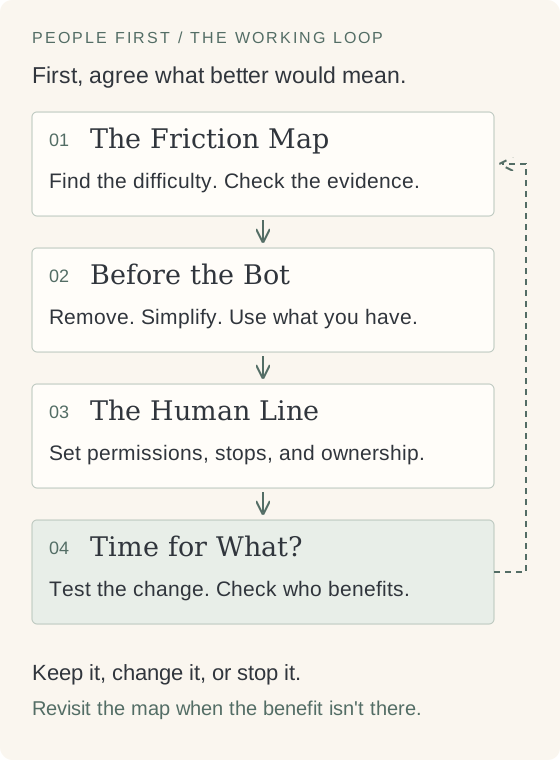
People First is my framework for having that conversation. It brings four smaller frameworks together: The Friction Map, Before the Bot, The Human Line, and Time for What? Start with the work and the people doing it. Decide what deserves to change, where a person needs to stay involved, and what the change should make possible.
My position is simple: if the best answer is to remove a task or use something you already have, that’s a good result. You don’t owe the problem a new system.
People First, at a glance
Use these questions with the person doing the work, on one real process.
| Framework | The question | Leave with |
|---|---|---|
| The Friction Map | Where does work get stuck, and who feels it? | One evidenced problem to address |
| Before the Bot | Do we need this task at all? | The smallest worthwhile change |
| The Human Line | Where must a person stay involved? | Boundaries, an owner, and a handover |
| Time for What? | What should recovered time make possible? | A purpose and a way to check it |
Here are the rules I use to connect them:
- If you can’t show where the difficulty happens, observe before choosing a fix. A complaint tells you where to look, but the cause may sit earlier in the process. If applications keep coming back incomplete, watch an application arrive before buying a reminder tool.
- If the result serves no remaining purpose, question the task before automating it. Otherwise you’re paying to preserve work nobody needs. A report that nobody uses is a candidate to retire, after checking who depends on it and whether it must be kept.
- If an error could cause harm that’s hard to repair, limit what the system can do before it acts. A correction afterward may arrive too late. A system can assemble an application for review without deciding whether the applicant gets a place.
- If the saved effort comes back as checking elsewhere, count it. Work doesn’t disappear because it leaves one person’s calendar. A faster report isn’t a gain if another team spends longer correcting it.
These aren’t four gates you pass once. Start by naming what better would mean, then work through the map and the options. Revisit the human boundary whenever the proposed change grows. A safety boundary takes precedence over a time saving. An unresolved question means a smaller test, or a pause, rather than permission to proceed.
You can use the People First worksheets alongside this article. Paper is enough too.
The Friction Map: where does the work actually get stuck?
Start by asking what the process is supposed to make possible. Then follow what actually happens, including the work people do around the official process to keep it moving.
The copying is visible. The waiting, chasing, and quiet corrections take more effort to find.
Ask the person doing the work to walk through a recent example. Where did they wait? Where did they enter the same information again? What came back? Who had to stop their own work to help?
Separate what you observed from what you’re assuming. “Three applications came back missing the same field” is an observation. “People don’t read the instructions” is an explanation you haven’t earned yet.
Imagine a programme coordinator copying registrations from a form into a spreadsheet and then into a CRM. This is a fictional process, not a client case. The obvious request is an integration. But the spreadsheet might exist because nobody trusts the CRM view, or because someone needs a weekly count they can’t find there. Those need different fixes.
The map should leave you with one place to start, chosen for its effect on people, the effort involved, and the team’s ability to take on the change. The most annoying task isn’t automatically the best first project.
I’ve written about different causes that make work slow. The same discipline applies here: find the cause before choosing the remedy.
Keep this: a short description of the process, the people affected, the evidence, and the uncertainty you still need to resolve.
Before the Bot: do we need this task at all?
Once you’ve found the friction, resist the urge to build its exact opposite.
Slow copying doesn’t necessarily need fast copying. You may be able to stop copying.
Work through the options in this order:
- Remove it, if its purpose has gone. Ask who uses the result and what breaks if it stops. Check obligations and dependencies before retiring anything.
- Simplify what remains. Fewer fields, a clearer handoff, or a named owner may remove the problem without adding a tool.
- Check what you already have. An existing view, form, or notification may be enough, and someone already knows how to maintain it.
- Choose the mechanism for the remaining work. Clear, stable rules may need ordinary automation. Interpreting varied text may benefit from AI. Context and judgment may still need a person.
In our registration example, suppose the coordinator confirms that the spreadsheet only produces a count the CRM can already show. Try using that view and removing the duplicate entry. There’s no reason to build a bot to maintain the spreadsheet.
If the spreadsheet does serve a separate purpose, the answer changes. Keep that purpose visible while testing a simpler way to meet it.
This is also where you ask who will run the thing. A tool that saves the coordinator work but needs an unavailable developer every time a field changes has a cost the demo won’t show. The distinction between AI agents and traditional automation matters after you’ve established that the task should exist.
Keep this: the proposed change, why the cheaper options aren’t enough, and a small test that could prove you wrong.
The Human Line: where does a person need to stay involved?
“A human will review it” leaves almost everything important undecided.
Which human? Looking at what? Before or after the action? With enough time to disagree, and the authority to stop it?
Correct information can still call for a human conversation. A participant explaining a difficult situation needs someone who can listen and respond, even when every field in the form is valid.
Draw the line around actions and consequences. A system might collect documents, point out a missing field, or prepare a draft. That doesn’t give it permission to decide an exception or tell someone they aren’t eligible.
Ask what a mistake would cost the person on the receiving end, and how they could challenge it. Then write down what may happen automatically, what requires approval before action, and what must stop and go to a named person.
For our coordinator, transferring a registration and deciding admission are separate decisions. If two documents disagree, the system shouldn’t quietly pick whichever value is easiest to read. It should surface the conflict, show the sources, and hand it to someone who can resolve it. If that person is away, the case stays pending or goes to a named backup. Silence isn’t approval.
The reviewer needs the original information, an explanation of what needs attention, and the ability to correct or reject the proposal. They also need time and training. Check actual review decisions during the test; a queue full of approved items doesn’t tell you whether anyone looked.
For a fuller set of boundary tests, see what should you not automate?.
Keep this: allowed actions, required approvals, stop conditions, a responsible person, and a correction route the affected person can actually use.
Time for What?: what should the recovered time make possible?
Ask this before making the change. Check the answer afterward.
“We’ll save time” is incomplete. The coordinator may want time to call participants who need help. Their manager may be assuming that the same hours will absorb more registrations. You want that conversation while there’s still a choice.
A lighter workload is a worthwhile answer. Someone leaving on time doesn’t need to disguise that as another productivity target.
Measure the whole process at a comparable workload, including review, corrections, maintenance, and work handed to somebody else. Keep elapsed waiting time separate from staff effort. A case sitting overnight isn’t eight hours of labour saved by processing it immediately.
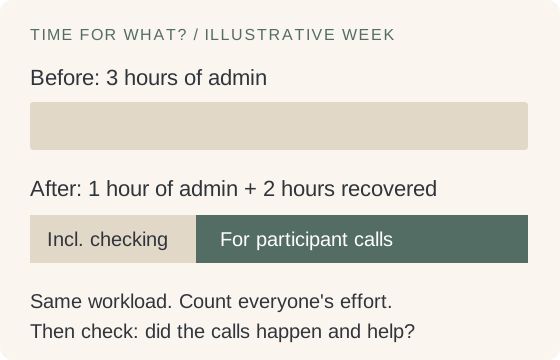
For illustration, suppose registration admin takes three staff hours a week. After the change, it takes one hour, including the remaining checking and upkeep across everyone involved. That’s two hours recovered. If the team chose participant calls as the purpose, check whether those calls happened and whether they helped. If the hours were swallowed by another queue, record that too.
And make room for the answer nobody wants to put in the update: it didn’t help enough. You can change the design or stop the test. The work you put into building it doesn’t make the benefit real.
Keep this: the baseline, the net change in effort, the team’s chosen use of the time, and a date to ask what actually improved.
Try it this week
You don’t need an organisation-wide programme to use this. Pick one process with a clear beginning and end.
- Walk through recent examples with the people doing and receiving the work. Include a case that got stuck. Record what happened and what you’re still guessing.
- Choose one change. Write down what you’d remove or simplify before considering a new tool. Agree what better would look like for the people involved.
- Write the human boundary. Name the owner, what can happen without approval, and when work stops. If you can’t contain a harmful mistake, use fictional cases until you can.
- Run a small, reversible test. Keep the old route available. Record review and correction effort as well as the work that got faster.
- On an agreed review date, decide whether to keep, change, or stop it. Compare similar volumes, include unfinished cases, and ask whether the intended benefit reached the people it was meant for.
If removing a redundant step solves it, stop there. If the process is rare, still changing, or has no one available to own the result, a manual route may be the sensible choice for now.
This is the introduction to the People First series. Each framework will get its own article with more detailed worksheets, examples, and awkward cases. The questions here are enough to make a first decision today.
If you need help choosing among competing problems and turning that choice into a buildable plan, that’s what an AI & Automation Opportunity Audit adds: a comparison of the opportunities, their costs and risks, and the ones I’d leave alone. Start with one process and the person who knows it. You may already have enough between you to fix it.